Photopad: Encrypting Text with JPEG Files
🗓 posted Jul 17, 2026 by Josh Erb🔢 1849 words
🏷 #development #learning
The Idea
A while back, I'm not sure when, I had the idea that maybe it would be interesting if you could use an image to encrypt some text.[1] I tucked the idea a way and didn't think about it very much. A little bit later, again I'm not sure when, a co-worker was rhapsodizing about how great it was to work with Go and I thought, I'd like an excuse to get more familiar with Go syntax and the standard library.
At some point these two wires crossed and the idea for photopad was born. photopad is a small CLI that can encrypt and decrypt .txt files using a .jpeg image as a sort of "pre-shared key."
The Goal(s)
I want a command line tool that takes a .txt file .jpeg image as input and generates either an encrypted or unencrypted output. And I want to do all of this in Go.
Some other loose requirements:
- Using the same image with the same text should always produce the same result in either direction, i.e. no information loss or scrambling
- Shifting should be tied to an a stable and immutable way of ordering characters (preferably Unicode)
- The program should only use the Go standard library (if possible)
A Hypothetical
A simple scenario will help clarify why a tool like this might be helpful. Say you recently read Gravity's Rainbow by Thomas Pynchon and you want to share this quote with a good friend:
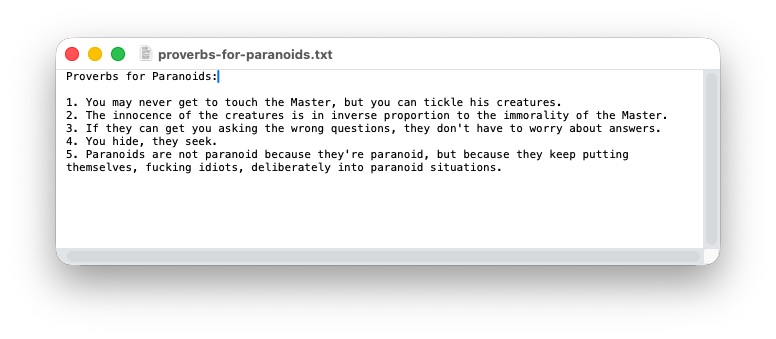
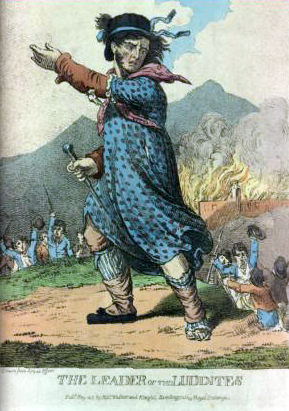
Your friend is only able to receive .txt files sent via email. But they're concerned that, despite many claims to the contrary, their email provider is snooping on their messages. With a tool like photopad, the two of you could agree on using, say, this public domain illustration of Ned Ludd that you found on archive.org to encrypt the message:
This way, the contents of the file you send will look like this:
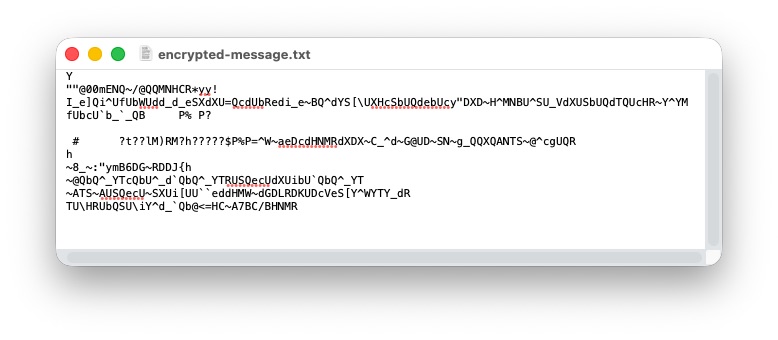
Your friend can then use photopad and the same image file to reverse the operation and read the original text. Comfortable in the knowledge that the message has been read by their eyes alone.
Step by Step
Go turned out to be a great fit for this project. Once I got used to some of its design choices and quirks, it was a breeze to work with images and Unicode ranges. I think it's worthwhile to break down what's going on under the hood. Mostly for posterity and my own future reference.
Creating the "Key"
The idea is that each pixel in an image can represent a single integer. This array of integers can then be amount of indexes within Unicode that a given character should shifted forward or back. This approach puts us somewhere between a Caesar cipher and a one-time pad. Even the image of King Ludd above, though it might feel small, has a total of 118,779 pixels and thus 118,799 shifting instructions that can be applied to a given string of text.
Some challenges arise, though. An image file is more or less a list of values that tell a machine what color to turn its pixels. These pixel values are commonly stored as red green blue alpha (RGBA) channel values which tell a machine what proportion of each a given pixel should have. But these 4-dimensional values aren't much use to us. How do we collapse each of these pixels down into a single value?
Fortunately, the concept of a color Palette has existed as long as Graphical User Interfaces have. I briefly went down the rabbit hole on how to convert an array of RGBA pixel values to the corresponding color index of a given palette. After an hour or two, although I was learning a lot, I got impatient and did some forum skimming. Lo and behold, it's actually quite trivial to do this in Go:
func GetPixelColorIndices(img image.Image) []uint8 {
	paletted := image.NewPaletted(img.Bounds(), palette.Plan9)

	draw.Draw(paletted, paletted.Rect, img, img.Bounds().Min, draw.Src)

	return paletted.Pix
}
There's a lot happening in the above code. After loading a JPEG image from disk and decoding it into a go Image object, I pass it to this function. The first line takes that image & creates an empty "paletted" image that's the same size as the original and assigns it the built-in "Plan9" color palette. The second line invokes the draw library to copy the original image into the paletted image, which will convert RGBA values to the nearest color index of the defined palette.
Once this operation is done, the Paletted object stores it's array of pixel indices as a public attribute that can be returned.
Here's what the final value looks like in the case of old King Ludd:
[136 153 170 170 187 204 204 187 204 221 ... ]This will be the "pad" we use to shift our Unicode characters around for either operation.
Shifting Unicode
We now have a list of numbers which can be used to move one Unicode pointer to another one. How can we do this in Go? Fortunately, Go is built with many helpful character encoding assumptions. Single characters are represented as "runes" which means that if we isolate a single character in a string it's trivial to identify its Unicode code point. We simply need to cast it to an int type.
For encrypting the character, then, we can take the input text string and iterate over each character. To know how far to shift the code point, we match the index of the character in the string to the index of the pad we generated from the image. We need to be mindful that a given text might have more characters than our image has pixels, so we determine the pad index using the modulus operator (what Go calls the "remainder" operator), i.e. a circular index.
shiftIndex := charIx % len(pads)
pad := pads[shiftIndex]
Now it's time to shift the character. Because of Go's rune data type, shifting the character is as simple as adding two integers together and using another circular index to limit our shifting to only ASCII characters.
newUnicodePoint := (int(character) + int(pad)) % int(unicode.MaxASCII)
return rune(newUnicodePoint)
Within the ASCII range of the Unicode table these operations stay relatively simple. Expanding the field of play to other ranges introduces additional considerations and pitfalls that I wanted to keep outside the scope of this project.
Unshifting Unicode
This is the tricky part. The tool is no good if we can't restore a shifted message back to it's original positions. Generating the pad from the image remains the same (as it must) and instead of increasing our circular index, we decrease it by the amount of shift.
Of course, because we're working with a circular index it takes a bit more finagling to account for how we'll handle crossing the 0 boundary if/when our shift value passes it.
Here's a simple example to illustrate. Let's say we're shifting an asterisk around a table with 5 columns. We start on index=3 and know that we have to shift left 11 positions:
| 0 | 1 | 2 | 3 | 4 |
|---|---|---|---|---|
| ✱ |
We need to first account for how many trips across the boundary lines our shift would take and discard all the round trips, so we keep only the remainder:
11 % 5 = 1We can then subtract this remainder from our maximum value to determine where the shift would be if we had started from the top most index.
4 - 1 = 3Hey, we're back where we started on our table!
| 0 | 1 | 2 | 3 | 4 |
|---|---|---|---|---|
| ⏺ |
But we have to take into consideration our actual starting point (index=3), which we know was further left than where we started before we applied the shift and is also greater than 0. So we adjust our shift by that much and ensure we properly account for the maximum boundary when we do so:
(3 + 3) % 4 = 2Et voilà:
| 0 | 1 | 2 | 3 | 4 |
|---|---|---|---|---|
| ✱ |
Here's what this looks like in the final Go code:
var BOUNDARY int = unicode.MaxASCII
oldUnicodePoint := (int(character) + (BOUNDARY - (int(shift) % int(BOUNDARY)))) % BOUNDARY
return rune(oldUnicodePoint)
A simple way to confirm we've done this correctly is to move in the other direction using remainder math for the index:
(2 + 11) % 5 = 13 % 5 = 3End Result
It's a simple tool, but it does the thing! The full source code lives at riastrad/photopad.
Granted it won't scale too well for bigger texts or for anyone using a very large image as a key. The cheeky example above isn't too demanding. However, when I tested it with the full Project Gutenberg text of Laurence Sterne's THE LIFE AND OPINIONS OF TRISTRAM SHANDY, GENTLEMAN (1,077,835 characters) using a large image of Géricault's The Raft of the Medusa (5,872 x 4,008 pixels, or 23,534,976 keys) it took about 6.5 seconds to encrypt and decrypt. I haven't done any more rigorous benchmarking than that and my local machine has decent compute power, so mileage most certainly will vary for other machines.
.jpg)
Of course there are also limitations to using this in the wild. For example, if you exchange image keys with someone via a messaging service that applies lossy compression when sending images, then the message will not decrypt properly. In order for the shift to work the image that encrypts and the image that decrypts must be a pixel perfect match.
Additionally, and as I mentioned earlier, I limited this first implementation to only shifting letters that appear in the ASCII range of Unicode. When I expanded this I started to run into issues caused (I think) by composite characters colliding with precomposed characters and I didn't have a clever way to address this and didn't want to fall too far down that rabbit hole.
At the end of the day, this was a pretense for getting a chance to get a bit more comfortable with Go. I was glad to find that the learning curve wasn't so steep coming from Node.js.
That being said, I do like the underlying idea that guided this project. If I have time and energy in the future, I might apply the same approach to a browser plugin. The loose idea being something like: the information is publicly listed, but only privately comprehensible. In other words, enable website owners to publish completely encrypted web pages that are only decipherable for visitors who know and possess the proper key image.
For the moment, though, this little CLI will have to suffice.
I don't presume to be the first. It's possible this already exists and has a domain specific name I'm not expert enough to recognize.
<< all notes.